
Claim deployments (temporary accounts)
Temporary preview accounts let you deploy and test Workers before you authenticate with Cloudflare. You can then claim the account to keep its deployments and supported resources.
Cloudflare Drop ↗ demonstrates this preview-and-claim lifecycle for static sites. Platforms can use the REST API to offer a similar experience for generated applications.
For design context, refer to Temporary Cloudflare Accounts for AI agents ↗.
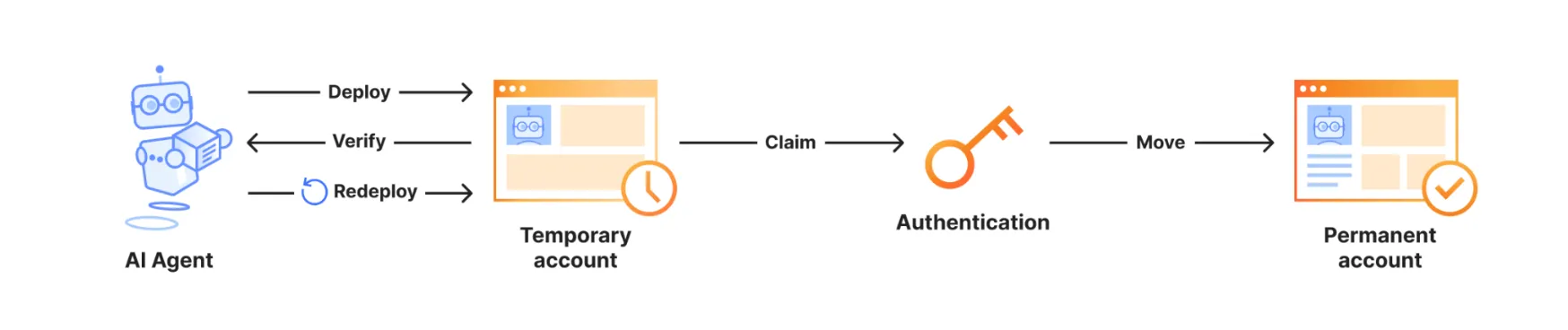
Choose an integration based on who controls account provisioning:
| Integration | Use when | Provisioning behavior |
|---|---|---|
Wrangler with wrangler deploy --temporary | An AI agent or tool runs Wrangler | Wrangler creates or reuses the account and prints the claim URL |
REST API at api.cloudflare.com/client/v4/provisioning/previews | Your platform backend controls the deployment experience | Your backend receives temporary credentials and the claim URL |
For production and continuous integration and continuous deployment (CI/CD), use a permanent Cloudflare account. Authenticate with wrangler login or a Cloudflare API token.
Use Wrangler when an AI agent or tool runs deployment commands. Wrangler manages the proof-of-work challenge, credentials, and claim URL.
Wrangler 4.102.0 or later prints guidance to rerun unauthenticated deployments with --temporary.
-
Install or update Wrangler to version 4.102.0 or later.
For installation instructions, refer to Install and update.
-
Give your AI agent a deployment prompt.
For example:
Make a very simple Hello World Cloudflare Worker in TypeScript and deploy it using the Wrangler CLI. Do not ask me questions. -
Let the agent run
wrangler deploy.In an unauthenticated, non-interactive session, Wrangler prints output similar to the following:
To continue without logging in, rerun this command with `--temporary`.Wrangler will use a temporary account and print a claim URL.This output tells the agent to rerun the command with
--temporary. -
Rerun the deployment with
--temporary.npx wrangler deploy --temporaryyarn wrangler deploy --temporarypnpm wrangler deploy --temporaryWrangler prints output similar to the following:
Continuing means you accept Cloudflare's Terms of Service (https://www.cloudflare.com/terms/) and Privacy Policy (https://www.cloudflare.com/privacypolicy/).Temporary account ready:Account: example-name (created)Claim within: 60 minutesClaim URL: https://dash.cloudflare.com/claim-preview?claimToken=<CLAIM_TOKEN>Uploaded example-workerDeployed example-worker triggershttps://example-worker.example-name.workers.dev -
(Optional) Redeploy changes before claiming the account.
Wrangler caches and reuses the account while its credentials and claim URL remain valid. The output identifies whether Wrangler created or reused the account.
Wrangler clears the cached account when you run
wrangler loginorwrangler logout.Wrangler stores these temporary values in the current operating-system user's global configuration directory. Do not share this directory between platform users.
Use the REST API when your platform backend controls deployments. The backend provisions an account before the user authenticates, then deploys supported resources.
Make all provisioning and deployment calls from your backend. The provisioning response contains sensitive credentials and a claim URL.
The following diagram shows how the platform keeps temporary credentials in its backend while the user previews and claims the deployment:
flowchart LR
    accTitle: Platform preview and claim architecture
    accDescr: A user accepts Cloudflare's policies and requests a preview in the platform UI. The trusted platform backend creates a temporary account, keeps account.apiToken private, deploys the Worker, and returns only the preview and claim URLs to the UI. The claim URL is a bearer credential shown only to the intended user. The user claims the account in the Cloudflare dashboard. Future platform deployments require a separate OAuth flow.

    USER((User))

    subgraph PLATFORM["Platform"]
        direction TB
        UI["Platform UI<br/>No temporary API token"]
        BACKEND["Trusted platform backend<br/>Stores account.apiToken"]
        UI -->|"2. Request preview"| BACKEND
        BACKEND -->|"10. Preview URL and bearer claim URL only"| UI
    end

    subgraph CLOUDFLARE["Cloudflare"]
        direction TB
        API["Cloudflare API"]
        DASHBOARD["Cloudflare dashboard<br/>Claims the account"]
    end

    USER -->|"1. Accept policies and generate application"| UI
    BACKEND -->|"3. Request challenge"| API
    API -->|"4. Challenge parameters"| BACKEND
    BACKEND -->|"5. Solve challenge locally"| BACKEND
    BACKEND -->|"6. Create temporary account with solution"| API
    API -->|"7. Account ID, API token, and claim URL"| BACKEND
    BACKEND -->|"8. Deploy Worker and request subdomain"| API
    API -->|"9. workers.dev subdomain"| BACKEND
    UI -->|"11. Show live preview and intended-user-only claim link"| USER
    USER -->|"12. Sign in and complete claim"| DASHBOARD
    DASHBOARD -.->|"Optional after claim"| OAUTH["Separate OAuth flow<br/>for future platform deployments"]
Request a proof-of-work challenge before creating the temporary account:
curl "https://api.cloudflare.com/client/v4/provisioning/previews/challenge" \ -X POST \ -H "Content-Type: application/json" \ --data '{}'The response includes the challenge token, seed, and difficulty parameters:
{ "success": true, "result": { "challengeToken": "<CHALLENGE_TOKEN>", "seed": "<BASE64URL_32_BYTE_SEED>", "k": 8000, "g": 2000 }, "errors": [], "messages": []}Solve the challenge by computing a sequential SHA-256 checkpoint chain:
- Decode
seedas Base64URL. It must decode to 32 bytes. - Compute
checkpoint[0] = SHA-256(seed). - For each segment from
0tok - 1, computegsequential SHA-256 hashes from the previous checkpoint, then append the result. - Concatenate all
k + 1checkpoints. Each checkpoint is 32 bytes. - Encode the concatenated bytes with standard Base64. Send that value as
solution.checkpoints.
Before solving a challenge, require k and g to be positive integers. Reject the challenge if seed does not decode to 32 bytes or if k * g exceeds 64,000,000.
The following Node.js example applies these bounds and returns the object required by the create request:
import { createHash } from "node:crypto";
function sha256(value) {  return createHash("sha256").update(value).digest();}
export function solvePreviewChallenge({ challengeToken, seed, k, g }) {  const seedBytes = Buffer.from(seed, "base64url");  if (seedBytes.length !== 32) {    throw new Error("seed must decode to 32 bytes");  }  if (!Number.isInteger(k) || k <= 0) {    throw new Error("k must be a positive integer");  }  if (!Number.isInteger(g) || g <= 0) {    throw new Error("g must be a positive integer");  }  if (k * g > 64_000_000) {    throw new Error("k * g must not exceed 64,000,000");  }
  const checkpoints = [];  let hash = sha256(seedBytes);
  checkpoints.push(hash);
  for (let segment = 0; segment < k; segment++) {    for (let iteration = 0; iteration < g; iteration++) {      hash = sha256(hash);    }
    checkpoints.push(hash);  }
return { challengeToken, solution: { checkpoints: Buffer.concat(checkpoints).toString("base64"), }, };}import { createHash } from "node:crypto";
type PreviewChallenge = { challengeToken: string; seed: string; k: number; g: number;};
function sha256(value: Uint8Array): Buffer { return createHash("sha256").update(value).digest();}
export function solvePreviewChallenge({ challengeToken, seed, k, g,}: PreviewChallenge) { const seedBytes = Buffer.from(seed, "base64url"); if (seedBytes.length !== 32) { throw new Error("seed must decode to 32 bytes"); } if (!Number.isInteger(k) || k <= 0) { throw new Error("k must be a positive integer"); } if (!Number.isInteger(g) || g <= 0) { throw new Error("g must be a positive integer"); } if (k * g > 64_000_000) { throw new Error("k * g must not exceed 64,000,000"); }
const checkpoints: Buffer[] = []; let hash = sha256(seedBytes);
checkpoints.push(hash);
for (let segment = 0; segment < k; segment++) { for (let iteration = 0; iteration < g; iteration++) { hash = sha256(hash); }
checkpoints.push(hash); }
return { challengeToken, solution: { checkpoints: Buffer.concat(checkpoints).toString("base64"), }, };}Require the user to accept Cloudflare's Terms of Service ↗ and Privacy Policy ↗ before account creation. Set acceptTermsOfService to "yes" only after the user accepts both.
Then send the proof-of-work solution with the required policy fields:
curl "https://api.cloudflare.com/client/v4/provisioning/previews" \ -X POST \ -H "Content-Type: application/json" \ --data '{ "termsOfService": "https://www.cloudflare.com/terms/", "privacyPolicy": "https://www.cloudflare.com/privacypolicy/", "acceptTermsOfService": "yes", "challengeToken": "<CHALLENGE_TOKEN>", "solution": { "checkpoints": "<BASE64_CHECKPOINTS>" } }'The response includes temporary credentials and a claim URL:
{ "success": true, "result": { "account": { "id": "<TEMPORARY_ACCOUNT_ID>", "name": "<TEMPORARY_ACCOUNT_NAME>", "type": "standard", "apiToken": "<TEMPORARY_ACCOUNT_API_TOKEN>", "tokenId": "<TEMPORARY_TOKEN_ID>", "expiresAt": "<ACCOUNT_EXPIRES_AT>" }, "claim": { "token": "<CLAIM_TOKEN>", "url": "https://dash.cloudflare.com/claim-preview?claimToken=<CLAIM_TOKEN>", "expiresAt": "<CLAIM_EXPIRES_AT>" } }, "errors": [], "messages": []}Before using the response, confirm that success is true. Verify that account.id, account.apiToken, account.expiresAt, claim.url, and claim.expiresAt are present.
Use account.id and account.apiToken with supported Cloudflare API endpoints. Use temporary values only with supported resource operations.
Temporary account tokens do not grant every permanent-account API permission. Unsupported operations return an authorization error.
The following examples upload and deploy a Worker with the Workers Script Upload API, then retrieve the account's workers.dev subdomain.
curl "https://api.cloudflare.com/client/v4/accounts/$CLOUDFLARE_ACCOUNT_ID/workers/scripts/$SCRIPT_NAME" \ -X PUT \ -H "Authorization: Bearer $CLOUDFLARE_API_TOKEN" \ -F 'metadata={"main_module":"worker.mjs","compatibility_date":"<YYYY-MM-DD>"};type=application/json' \ -F 'worker.mjs=@worker.mjs;type=application/javascript+module'Call the Get Subdomain endpoint with the temporary credentials:
curl "https://api.cloudflare.com/client/v4/accounts/$CLOUDFLARE_ACCOUNT_ID/workers/subdomain" \ -H "Authorization: Bearer $CLOUDFLARE_API_TOKEN"For a script available on workers.dev, combine result.subdomain with the script name to create the deployment URL: https://<SCRIPT_NAME>.<SUBDOMAIN>.workers.dev.
Use the Cloudflare TypeScript SDK ↗ for supported resource operations after provisioning the temporary account:
import Cloudflare from "cloudflare";
export async function deployWorker(  accountId: string,  apiToken: string,  scriptName: string,  compatibilityDate: string,  scriptContent: string,) {  const client = new Cloudflare({ apiToken });  const workerModule = new File([scriptContent], "worker.mjs", {    type: "application/javascript+module",  });
  await client.workers.scripts.update(scriptName, {    account_id: accountId,    metadata: {      main_module: "worker.mjs",      compatibility_date: compatibilityDate,    },    files: [workerModule],  });
  const { subdomain } = await client.workers.subdomains.get({    account_id: accountId,  });
  return `https://${scriptName}.${subdomain}.workers.dev`;}
Provide the deployment URL and claim.url to the intended user.
The intended user must complete the claim within 60 minutes. Opening the claim URL before the deadline is not enough.
They open the URL, sign in to Cloudflare or create an account, then complete the dashboard prompts.
If the user does not complete the claim, Cloudflare deletes the account and its resources.
With Wrangler, rerun wrangler deploy --temporary if the temporary credentials or claim URL expire. Wrangler provisions a new account and prints a new claim URL.
For REST integrations, request a new challenge and account if account.expiresAt or claim.expiresAt passes before the claim.
After the claim, the Worker and supported resources remain in the claimed account.
To continue with Wrangler, run wrangler login, then deploy without --temporary. Claiming does not grant the platform permanent access to the account.
For later deployments, connect the claimed account through your normal authenticated flow, such as a Cloudflare OAuth client.
The following table summarizes supported capabilities and limits. Temporary credentials do not grant every operation for these resources.
| Supported product or resource | Supported capability or limit |
|---|---|
| Workers | Deployments on workers.dev |
| Workers Static Assets | Up to 1,000 files, with each asset up to 5 MiB |
| Workers KV | Create, list, rename, and delete namespaces; put, get, list, and delete keys; bulk put, get, and delete |
| D1 | One database, with up to 100 MB per database and 100 MB total |
| Durable Objects | Deploy Workers with Durable Object bindings and migrations |
| Hyperdrive | Up to two database configurations and 10 connections |
| Queues | Up to 10 queues |
| mTLS and CA certificates | wrangler cert upload, list, and delete operations |
account.apiTokenauthorizes supported resource operations. Never expose it in browser responses or client-side code.- Treat
claim.urllike a bearer credential. Anyone with the URL can claim ownership of the temporary account. - Store both values only in backend storage or server-side session storage scoped to the intended user. Deliver
claim.urlonly to that user. - Exclude both values from logs, analytics, and support telemetry. Delete stored copies when they are no longer needed and no later than either returned expiration time.
- Cloudflare requires a proof-of-work check before creating an account. Wrangler handles the check, while REST integrations must submit a solution.
- Cloudflare rate limits temporary account creation. Wait before retrying, or authenticate with a permanent account.
--temporarysupports unauthenticated use only. Existing OAuth, API token, or global API key credentials cause an error.--temporaryis not a global flag. Only commands that support temporary credentials include it.- Temporary account provisioning is available only through the default public API endpoint. It is unavailable through the FedRAMP High API endpoint.
- Cloudflare may reject requests that fail additional abuse-prevention checks.